 ClearNative
How to use this Australia arrival checklist
Plan your move in four stages: before you fly, your first day, your first week and the rest of your first month. Start with somewhere to stay, a working phone and access to essential documents. Then choose the admin tasks that apply to your visa, state and plans.
These are suggested planning stages, not government deadlines. A pending application is still pending: keep its next action visible. You may already have completed some steps before arrival; skip or adapt them rather than applying again.
Before you fly: prepare your landing
Check your visa details and conditions
For visa holders; the checks depend on your own visa.
- Have ready
- Passport or travel document, visa grant details and the information requested by Home Affairs.
- Where to start
- Read the official VEVO instructions. Check the conditions shown for your own record before making work or study plans.
- Done for now when
- You can access your current visa details and have noted any conditions you need to follow. A TFN or a checklist does not establish work permission.
Confirm your first night and airport journey
For everyone arranging accommodation and arrival transport.
- Have ready
- Booking reference, full address, check-in instructions, arrival time and a payment method.
- Where to start
- Contact your accommodation provider using its verified website or booking confirmation. Use the airport’s official website to check transport options.
- Done for now when
- You have an accessible address, a confirmed check-in plan and a backup if your flight is delayed. Save these offline.
Check what you are bringing
For travellers packing food, medicines or other personal items.
- Have ready
- A packing list, medicine packaging and any supporting documents specified for the items you carry.
- Where to start
- Check Australian Border Force’s item guidance. Follow the current instructions for your specific items, including any declaration or permission requirements.
- Done for now when
- You have checked uncertain items and know what documents or declarations the official guidance calls for. Recheck close to travel.
Keep essential records accessible
For everyone; use a private storage method you control.
- Have ready
- Passport and visa records, accommodation details, emergency contacts and relevant insurance contacts.
- Where to start
- Use your chosen secure document and backup services. NewToAU is a planning app; it is not a passport or identity-document vault.
- Done for now when
- You can retrieve the documents without depending on one phone, and a trusted contact knows how to reach you.
First day: get connected and settled
Reach your accommodation and confirm access
For everyone arriving at a new address.
- Have ready
- Offline address, booking details and the provider’s contact number.
- Where to start
- Follow your confirmed transport and check-in plan; contact the accommodation provider if it changes.
- Done for now when
- You can enter your accommodation, charge your phone and tell a trusted person you have arrived.
Set up a reliable way to call and receive messages
For anyone who needs a local mobile service or roaming plan.
- Have ready
- An unlocked compatible phone, payment method and the identification your chosen provider requests.
- Where to start
- Start on the mobile provider’s official website or in its store. Check coverage, total cost, activation and ID requirements for that plan.
- Done for now when
- Your chosen service is active and you have tested a call and a message. Keep account recovery details accessible.
Find the services relevant to your location
For everyone; transport, housing and help services vary by location.
- Have ready
- Your state or territory, local address and the services you need first.
- Where to start
- Use Home Affairs’ settlement topic directory to find the relevant services. In NewToAU, set your state and visa or residency category.
- Done for now when
- You have the correct local service links and know where to find help for your next practical task.
First week: organise money, tax and healthcare
Compare and set up everyday banking
If you need an Australian transaction account.
- Have ready
- Your expected fees and features, contact and address details, and the identity documents your chosen bank accepts.
- Where to start
- Compare account features with ASIC Moneysmart. Then follow the selected bank’s official application and verification process. Use our bank-account preparation checklist.
- Done for now when
- The bank has confirmed what you can use now and what remains to activate or verify. Record any card-delivery or identity-check follow-up.
Choose the correct TFN application route
If you need a TFN and do not already have one.
- Have ready
- Your identity documents, a reliable correspondence address and any information requested by the ATO for your route.
- Where to start
- Start with the ATO’s TFN application directory. Read our TFN starting checklist before sending documents.
- Done for now when
- You have either found your existing TFN or submitted through the appropriate route and saved the reference and next action. Submission is not confirmation that a TFN has been issued.
Check your healthcare pathway
Eligibility and cover differ; do not assume all newcomers can enrol in Medicare.
- Have ready
- Passport and visa or residency details; existing health cover and the documents requested for your circumstances.
- Where to start
- Check Medicare eligibility and enrolment requirements with Services Australia. If you are an international student, also review Study Australia’s OSHC guidance and your provider’s policy.
- Done for now when
- You know which enrolment or insurance steps apply, have the relevant contact details and have recorded anything still awaiting confirmation.
Prepare for your housing search
If you are moving from temporary accommodation into a rental.
- Have ready
- Housing budget, preferred area, commute needs and the application documents requested for each property.
- Where to start
- Start with the rental viewing checklist. Use your state or territory’s tenancy authority for rules; the Victoria guide is scoped to Victorian rentals.
- Done for now when
- You have a comparison record for each viewing and a list of unresolved questions. Signing an agreement is a separate decision, not a required first-week milestone.
First month: follow up and build your routine
Prepare for your first job
If you plan to work; check your own visa conditions first.
- Have ready
- Your visa-condition record and the proposed role, pay, hours and employment details.
- Where to start
- Check your individual visa conditions and read Fair Work’s information for visa holders and migrants. Keep tax setup separate from permission to work.
- Done for now when
- You have checked the relevant conditions, kept the proposed employment details and identified any questions to resolve before starting.
Finish study setup where it applies
For people starting a course; the provider and course determine the next steps.
- Have ready
- Enrolment details, provider instructions, legal name and accepted ID if a USI is required.
- Where to start
- Follow your education provider’s enrolment and orientation instructions. Check the official USI requirements and look for an existing USI before creating another.
- Done for now when
- Your provider has confirmed the outstanding enrolment tasks, and any required identifier has been supplied through its official channel.
Review pending tasks and changed details
For everyone with applications, deliveries or a new address.
- Have ready
- Your private task record: submitted date, reference, next action and verified service contact.
- Where to start
- Return to each service’s official instructions or your application confirmation. Check whether your bank, insurer or provider needs an address update.
- Done for now when
- Each open item has one next action and follow-up date. Completed outcomes are recorded separately from applications still waiting.
Keep a small follow-up record
Use a private note with the fields below. These are fictional planning examples, not application receipts. Keep passport numbers, TFNs, passwords and document scans out of a general checklist.
| Task | Status | Next action |
|---|---|---|
| Mobile service | Active; call tested | Keep recovery details |
| Bank account | Verification pending | Complete the bank’s requested check |
| TFN application | Submitted; outcome pending | Follow the ATO’s stated timeframe |
The print button makes a paper copy of this guide. To track checklist progress on your device, use NewToAU. This web guide does not transfer a checklist or application into the app.
From your arrival plan to a checklist in the app
Use the web guide to prepare, then open NewToAU to keep track of your checklist. The screenshots below show the real English iPhone interface with an example profile and demonstration progress.
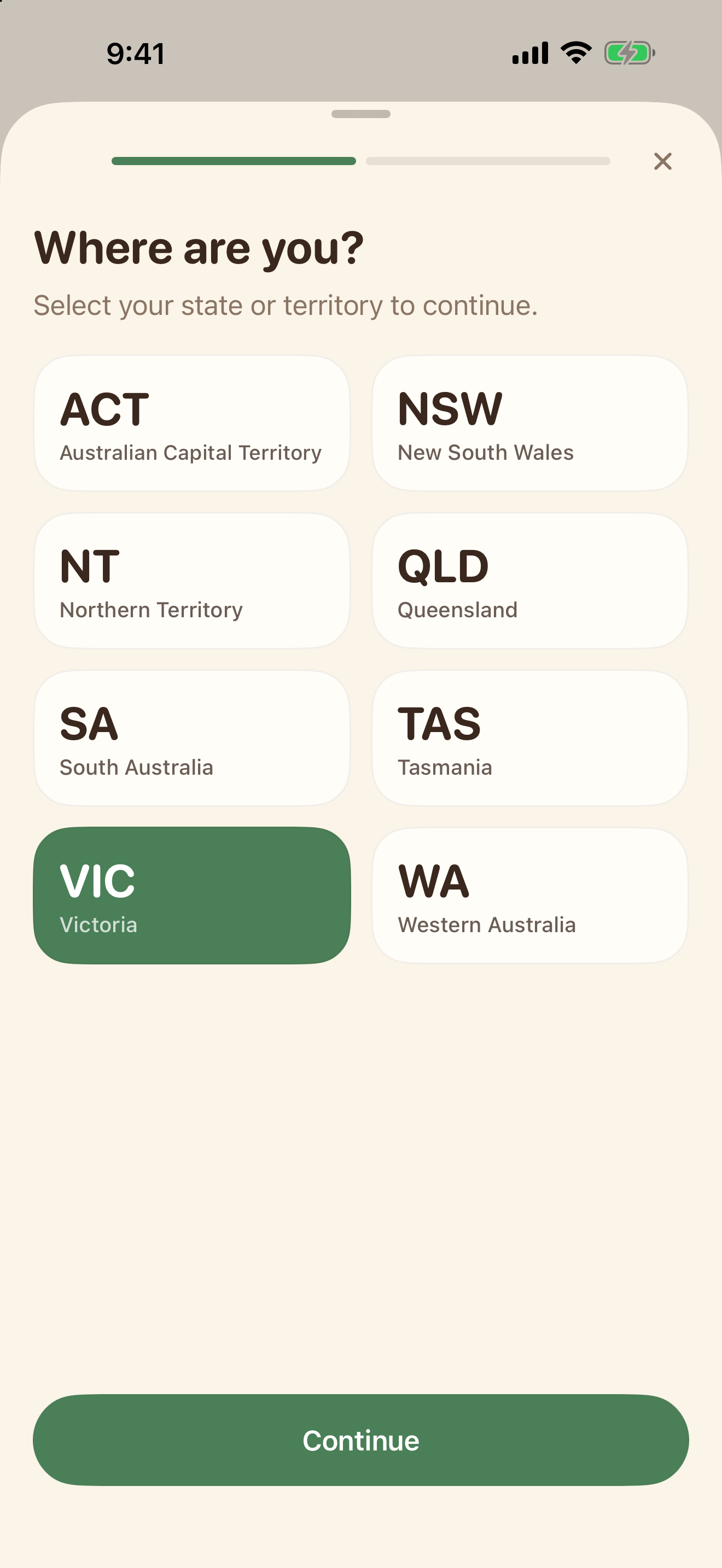
Choose your state
Open Settings and tap your profile card. Choose the state or territory where you live.
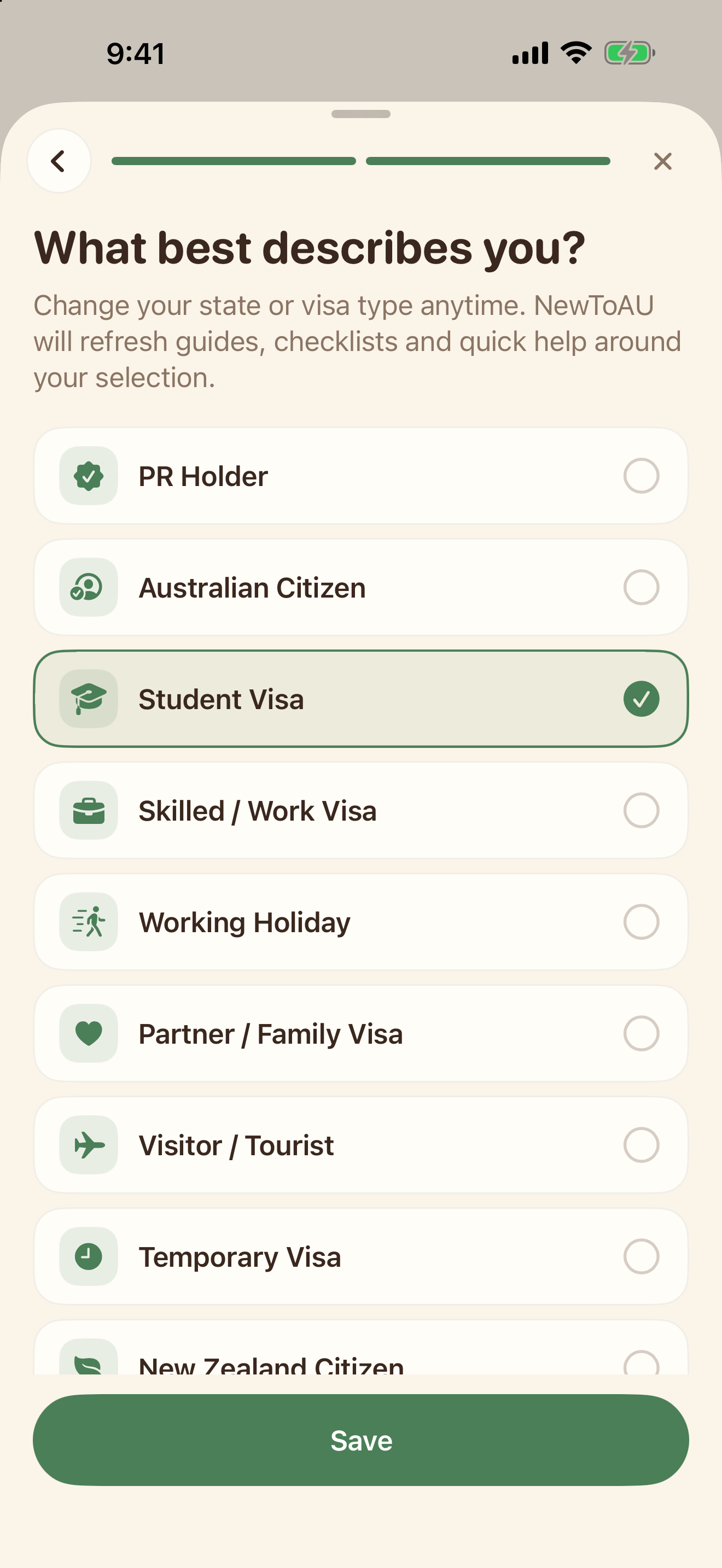
Choose your category
Continue to your visa or residency category, choose the option that describes you, then tap Save.
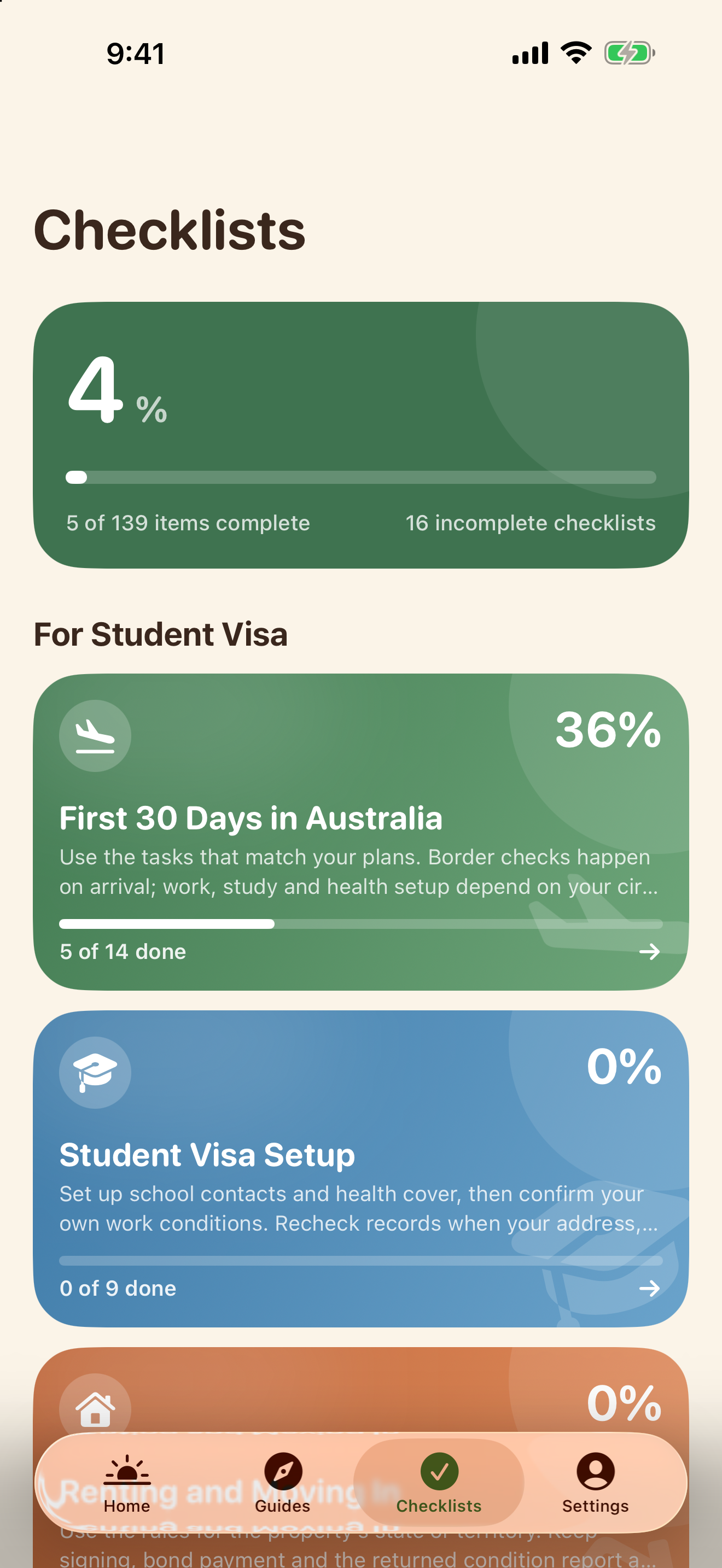
Find your next checklist
Tap Checklists. Open First 30 Days in Australia or another checklist relevant to your situation.
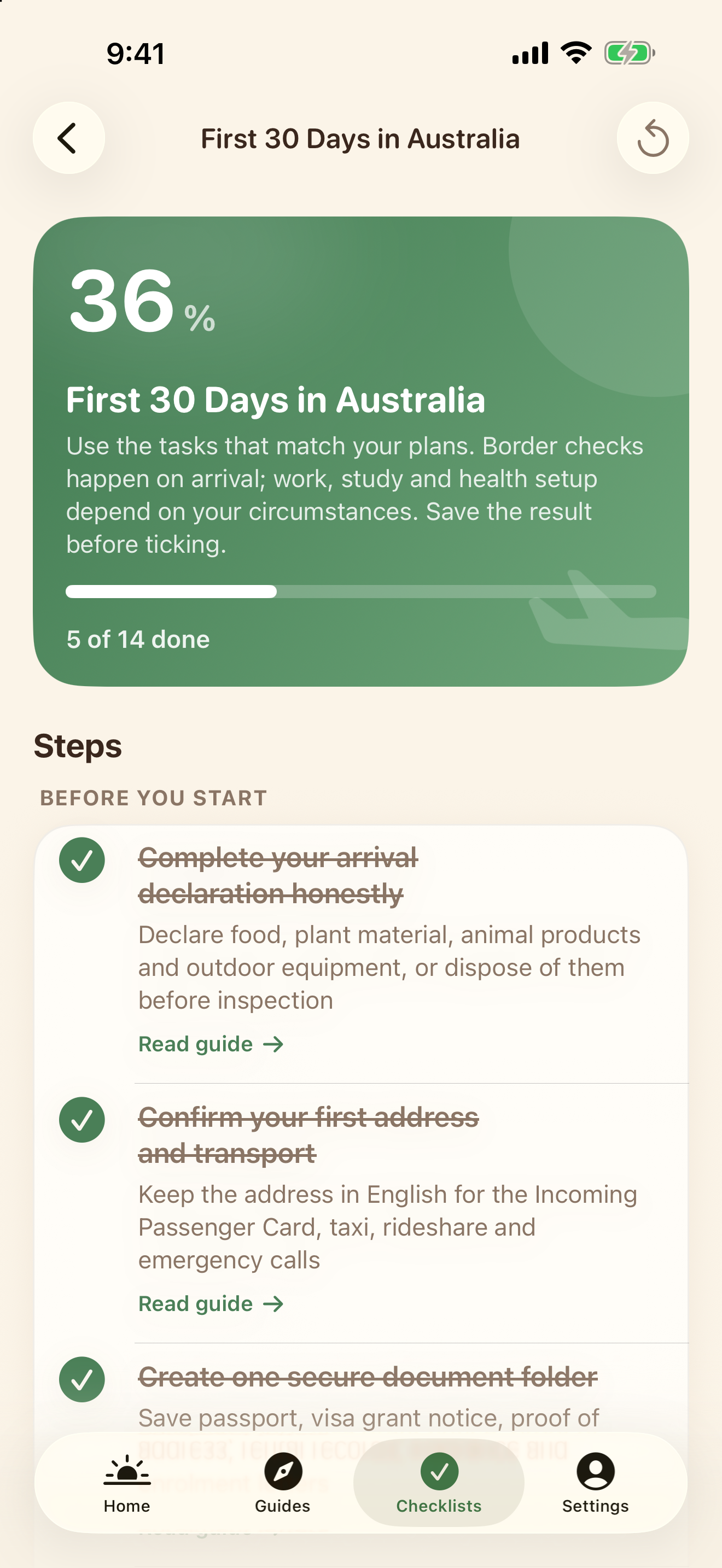
Tick completed steps
Open the checklist and tick the tasks you have completed. The progress summary updates as you go.
Your state and category help filter relevant content; they are not an eligibility assessment. Web tasks do not sync into the app. NewToAU does not submit applications or store your identity documents.
Official sources & scope
Use the linked official guidance to confirm requirements for your own circumstances. ClearNative is an independent publisher, not a government service.
- Home Affairs: key settlement topics
- Home Affairs: check visa conditions with VEVO
- Australian Border Force: can you bring it in?
- ASIC Moneysmart: transaction accounts and debit cards
- Australian Taxation Office: apply for a TFN
- Services Australia: enrolling in Medicare
- Study Australia: Overseas Student Health Cover
- Fair Work Ombudsman: visa holders and migrants
- USI: create your USI
General planning information. Eligibility and requirements depend on your circumstances. Official sources checked for this guide on 19 October 2026.